
I’m not ashamed to admit, before this week, I had no idea how a button on a website works.
I’ve used buttons for a long time, I’ve done short presses and long presses. I’ve made websites with default HTML buttons. Hell, I’ve even put together custom css for styling a button on a website. But I didn’t know how a browser takes code and makes a button. I never had a class on it (turns out it isn’t relevant to a mechanical engineering degree). I also recognize that we are in an age where everyone just talks about vibe coding and I’ll probably never need to know on a fundamental level how a button works.
Anyway, here is everything I’ve learned about buttons this week.
The First Button

Just a few years before I was born, the original HTML was created and it actually had no buttons. It only had the <a> tag. The <a> tag is the anchor tag, which works even to this day to embed links. It wasn’t until around 1992 that HTML+ was created, and along with it, interactive objects and inputs. Forms became possible as a result.
As an aside, I had no idea that Marc Andreesen, of Andreesen Horowitz fame, was part of the team at University of Illinois that created the graphical browser, NCSA Mosaic, that made these forms possible to render nor was I aware that he co-founded Netscape. It suddenly makes way more sense why he’s so successful; he’s the reason we saw the first set of buttons.
Rendering a Button
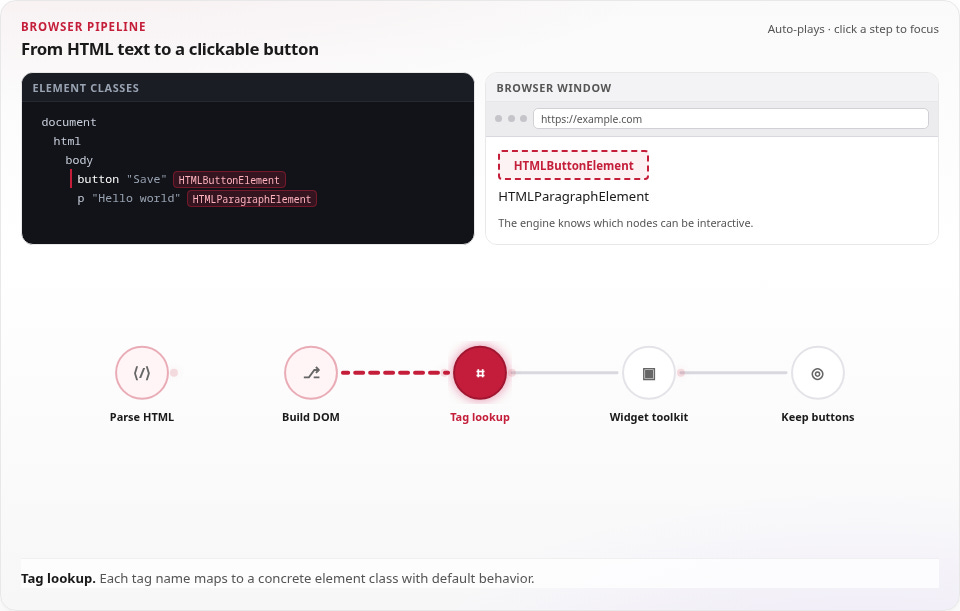
View the graphic above here.
The actual rendering of a button is actually exactly how you would expect it to work. Your browser takes HTML text, reads it, and then creates a tree of elements (DOM) and then creates nodes whenever it recognizes a tag. It maps those tags with a lookup table thats built into the browser, and then just wires how its supposed to work accordingly. Early versions of browsers used the operating system’s UI to draw the actual clickable button in the styling of the operating system.
Formalization of a Button
Hilariously, a <button> wasn’t fully defined until 1997 along with HTML 4.0, but it effectively became what we see today. The key innovations really are just the ability to click on it with more than just a mouse, and render it without an operating system toolkit. Instead, you can now use CSS and rendering engines instead of calling out to the operating system.
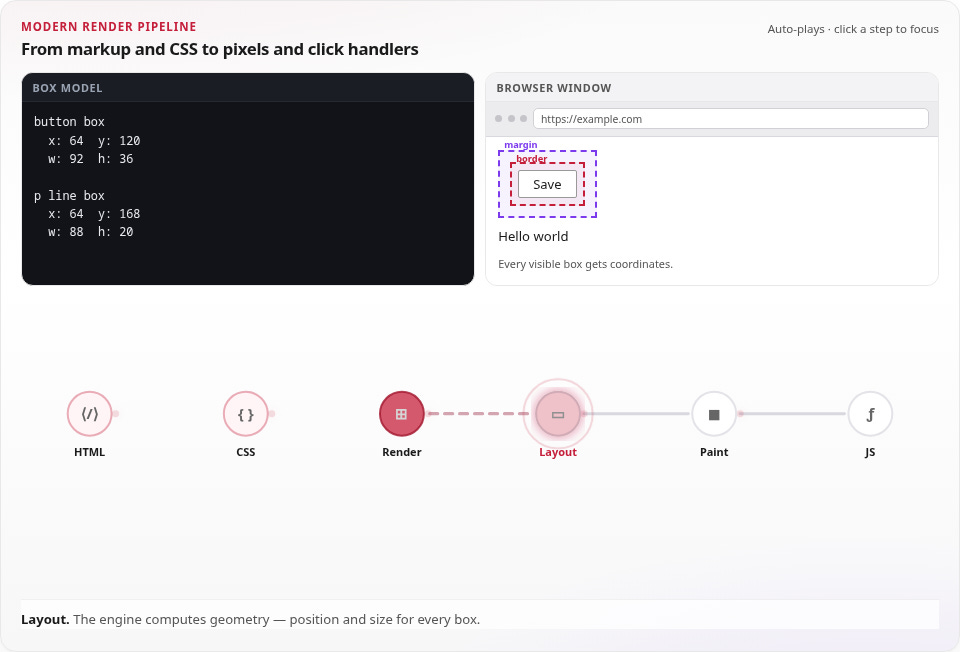
View the more modern interactive here.
Boringly enough, CSS is just another set of text that gets parsed and then creates an appearance based on a tree of style rules (CSSOM). There’s a bunch of traversal-ing that happens through the DOM and through the CSSOM as they combine into a render tree, and a layout procedure that occurs before everything is finally painted into pixels. But even after things are turned into pixels, there’s still some JavaScript thing that runs to connect your button to the planned outcome of that button.